
Pagevanta
Technical SEO audits on your machine
Audit websites, find technical issues, and build clear reports without sending data to the cloud.
v0.1.6 · Windows x64 · 95.9 MB
No registration required to download. FREE works immediately; registration includes a one-time 30-day PRO trial.
The installer does not yet have a publisher signature. Windows may display a warning.
SHA256
42c356b6710ac21ce624e91352b21249b33bdd59fff8bea033028d8407c25f09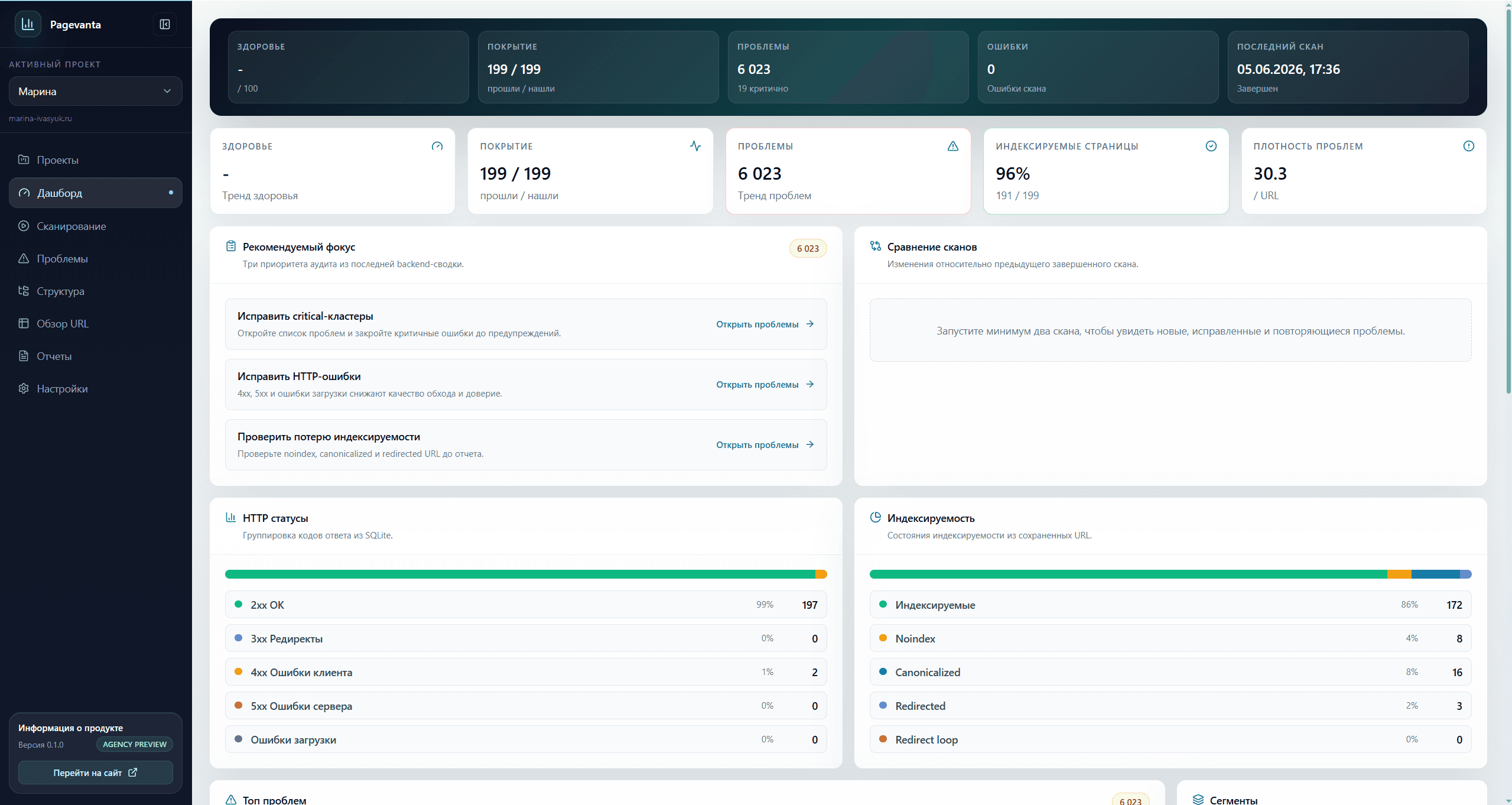
Pagevanta helps turn an audit into a decision faster.
The tool does more than find errors: it builds a view of site health, highlights what matters, and prepares materials for the next action.
Client
Short summary
Team
Shared priority
Development
Ready tasks
Result handoff
From audit to a clear plan
01
Summary
A report you can hand off
Pagevanta prepares a clear summary and result files so you can quickly show a client, site owner, or developer what needs to be fixed.
02
Priority
Issues are already grouped by meaning
The app separates critical errors from smaller notes so you do not have to inspect every page manually.
03
Local
The website is checked locally
Crawling, analysis, and result storage happen on your computer without sending the audit to the cloud.
Features by impact
The business value of the audit comes first.
This page highlights the features that produce value fastest: clear reports, fix priorities, careful crawling, and practical page review.
Reports
Show the audit outcome, not just a table of errors.
Pagevanta helps prepare materials for a client, team, or contractor: what was checked, where errors exist, and what to start with.
- Separate exports for pages, issues, files, and redirects
- Preview how much data will be included before saving
- Add agency name, client name, and a short note
Issue detection
See what breaks the SEO picture right away.
The app checks pages, links, images, and technical settings, then shows issues in human language.
- Pages that do not open, respond slowly, or return errors
- Empty or weak titles and search descriptions
- Broken internal links, wrong redirects, and search restrictions
Site crawl
The audit adapts to a real commercial website.
Pagevanta crawls carefully: it respects the sitemap, crawl rules, depth, and limits that you set.
- Audit the needed domain, subdomains, or a selected area
- Import pages from the sitemap
- See why some pages could not be checked
Page overview
Tens of thousands of URLs stay readable.
Even on a large site, the page list remains usable: find problematic URLs, compare them, and hand selected rows to the team.
- Filters reveal errors, noindex pages, and heavy files
- Column sets for audits, links, copy, and developer handoff
- Copy selected pages quickly for a task, email, or note
Audit depth
Data is collected for SEO, development, and client reporting at once.
Pagevanta shows more than a list of URLs. It explains which pages open, which are blocked from search, where links are broken, and what prevents the site from performing better in search.
Page titles, search descriptions, and primary headings
Search restrictions and pages that will not appear in search
Links, images, language versions, and social metadata
Page responses: OK, redirected, missing, or failing
Redirects, heavy files, and pages affected by complex scripts
Workflow
From the first URL to a clear list of fixes.
The flow stays short: create a project, run the audit, review issues, and export the result.
Create a project
Run the audit
Review issues
Save the report
Audit a website in Pagevanta and see where SEO potential is being lost.
Register to open the product area, download the app, and run your first technical audit.
RegisterWhat becomes clearer after the audit
- Understand a site's technical state faster
- Build a prioritized fix list
- Show clients a clear audit result
Pagevanta Pro
One toolkit. Choose your term.
490 ₽ monthly, 3,990 ₽ yearly or 4,990 ₽ once. No automatic charges.
Monthly
490 ₽
1 calendar month
- All local Pro features
- Two computers for one user
- Technical SEO audit
- Prioritized issues and recommendations
- Reports and data export
- Updates during your subscription
Yearly
3,990 ₽
12 months
- All local Pro features
- Two computers for one user
- Technical SEO audit
- Prioritized issues and recommendations
- Reports and data export
- Updates during your subscription
Lifetime
4,990 ₽
Perpetual
- All local Pro features
- Two computers for one user
- Technical SEO audit
- Prioritized issues and recommendations
- Reports and data export
- Future local Pro updates included
Lifetime has no expiry date. License verification requires an internet connection at least every 72 hours. Cloud AI, SERP and other metered third-party services are not included.